How to customize the Scooter Tools dashboard for safer glances
A customizable dashboard is useful when it reduces the time needed to understand the scooter. It becomes counterproductive when too many gauges, colors or small values demand attention while moving.
Configure before the ride and treat the phone as a glanceable instrument, not an interactive control panel on the road.
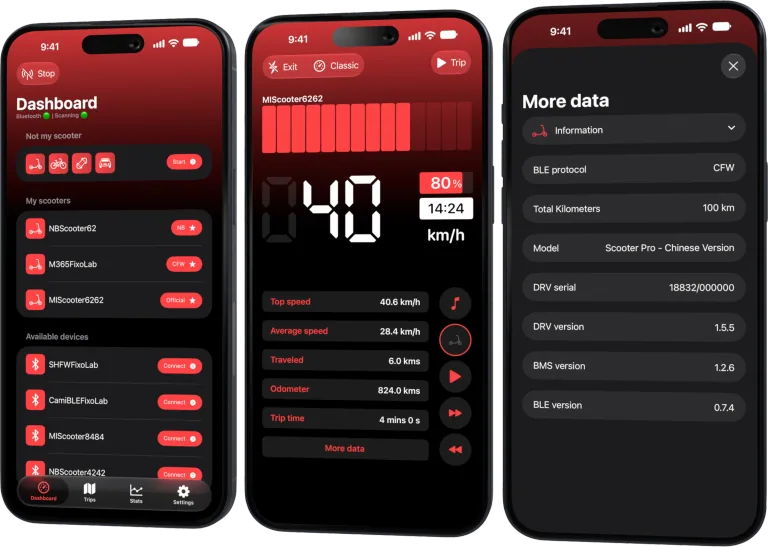
Your Xiaomi and Ninebot scooter dashboard
Monitor speed, battery, mileage, temperature and routes in real time, with support for official and custom firmware
Available on Android, iPhone, iPad and Mac, with iCloud sync on Apple devices
Start with the riding question
Choose the few values needed for the trip. For many riders that means current speed, battery state and one range or trip indicator. Temperature, voltage, mileage and detailed statistics can remain in a secondary view for stopped analysis.
More data is not automatically more safety.
Classic and customizable views
Scooter Tools includes a classic dashboard and a customizable Pro experience where supported. Availability and specific widgets can differ by platform, version, model and entitlement.
Use only fields whose meaning you understand. An unsupported or unavailable sensor should not be replaced by a guessed value.
Make the primary values readable
- Place the most important value in the easiest area to glance at.
- Use sufficient contrast in daylight and darkness.
- Avoid similar colors for normal and warning states.
- Keep units visible.
- Remove tiny secondary metrics that require prolonged focus.
- Test the mount and layout while stationary.
Do not make safety decisions from color alone; accessibility and ambient light can change perception.
Choose context by route
For a commute, battery and trip progress may matter. On a sustained climb, available temperature context may be useful after stopping. During a diagnostic test, voltage or current can be recorded without placing it at the center of normal riding.
Create a stable everyday layout instead of redesigning it at every traffic light.
Phone mounting and interaction
Use a secure, legal mount that does not block controls, steering, lights or the rider’s view. Check that vibration cannot release the phone. Follow local rules about screens and mobile-device interaction.
Stop in a safe place before changing pages, filters or dashboard configuration. Voice features or watch surfaces do not remove the need to keep attention on the road.
Validate each metric
Compare the selected field with the scooter and protocol description. Battery percentage, estimated range and trip distance have different meanings. If a value freezes, check connection state rather than assuming the vehicle itself stopped changing.
Privacy on visible screens
Avoid showing private scooter names, route endpoints or sensitive statistics on a Lock Screen or shared display. Widgets and Apple Watch may use snapshots with a different refresh time from the live dashboard.
For a simpler overview of fields, read battery, range, temperature and mileage in Scooter Tools.
Frequently asked questions
What is the best dashboard layout?
The one that shows the few essential values clearly for your legal, safe route. There is no universal arrangement.
Can I edit the dashboard while riding?
No. Stop safely before interacting with the app.
Why is a value unavailable?
The model, protocol, platform or current connection may not expose it.
Do widgets show the same live data?
Not necessarily. Extensions can use snapshots and platform-managed refresh schedules.
Your Xiaomi and Ninebot scooter dashboard
Monitor speed, battery, mileage, temperature and routes in real time, with support for official and custom firmware
Available on Android, iPhone, iPad and Mac, with iCloud sync on Apple devices
| FixoLab
What Scooter Tools Does (and Doesn't) Do to Your Scooter
What Scooter Tools actually does to your scooter: it reads data already reported over Bluetooth and shows it on a dashboard, without installing, modifying or unlocking anything.
| FixoLab
Feature Parity and Current Differences Between iOS and Android
What's the same and what's different between the Scooter Tools iOS and Android apps today, including widgets, Apple Watch and iCloud sync.
| FixoLab
Using the Not My Scooter Dashboard With Your Phone's Sensors
See how Not My Scooter uses your phone's own sensors for a speedometer-style dashboard, with no Bluetooth connection to a vehicle.
| FixoLab
How to compare scooter rides and battery efficiency
Use repeatable routes and Scooter Tools trip data to compare battery use without confusing weather, speed, elevation or payload with battery degradation.