Reading Battery, Range, Temperature and Mileage in Scooter Tools
Feature guide
What do the battery, range and temperature numbers mean?
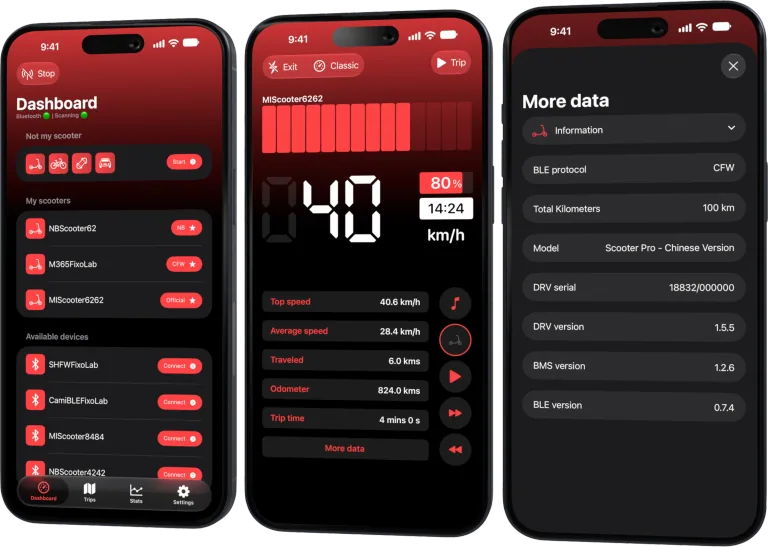
Scooter Tools reads battery percentage, estimated range, temperature and mileage directly from your scooter's BMS over Bluetooth, and displays them on your live dashboard.
What you need
- A connected, compatible scooter
- A verified BMS firmware version for full detail (see the compatibility table)
What each field means
- 1
Battery percentage
Current charge level as reported by the BMS.
- 2
Estimated range
A projection based on current battery level and recent usage, not a fixed number.
- 3
Temperature
Battery or motor temperature, where the model reports it.
- 4
Mileage
Total distance recorded by the scooter itself, separate from Scooter Tools' own trip history.
What you can track
- Live battery percentage and estimated range
- Temperature, where reported
- Total mileage from the scooter itself
Good to know
- Not every model reports every field — check the compatibility table
- Range estimates are approximate, not guaranteed
Troubleshooting
Temperature or mileage isn't showing
Some models and firmware versions don't report these fields over Bluetooth yet — check the compatibility table.
Frequently asked questions
Is the range estimate exact?
No, it's an estimate based on current battery level, not a guaranteed distance.
Does Scooter Tools calculate battery health?
It displays what the scooter's BMS reports; it doesn't run its own independent battery health analysis.
Check which fields your model supports
See the exact data available for your scooter and firmware.
Official sources: Segway — Ninebot KickScooter Max G30LP user manual · Xiaomi — Mi Electric Scooter user manual

Your Xiaomi and Ninebot scooter dashboard
Monitor speed, battery, mileage, temperature and routes in real time, with support for official and custom firmware
Available on Android, iPhone, iPad and Mac, with iCloud sync on Apple devices
| FixoLab
Why electric scooter range drops in cold weather
Understand why cold weather reduces Xiaomi and Ninebot scooter range and how to interpret battery, temperature and trip data in Scooter Tools.
| FixoLab
Electric scooter battery health warning signs and useful data
Separate normal range variation from possible electric scooter battery trouble using repeatable rides, available telemetry and physical warning signs.
| FixoLab
Eco, Drive and Sport modes on electric scooters explained
Compare electric scooter riding modes by acceleration, speed, range and traction, and use trip data to choose a mode for the route rather than the label.
| FixoLab
What to watch in electric scooter motor and battery temperature
Interpret available scooter temperature data in context, recognize thermal warning signs and avoid using one sensor value as a complete diagnosis.