SHFW as a Third Firmware Path for Scooter Tools Users
Protocols
What is SHFW and does Scooter Tools support it?
SHFW is a third firmware path some Ninebot owners use, alongside Official firmware and CFW. Scooter Tools users have reported it working alongside Official firmware on models like the Ninebot Max G30, read the same way as any other supported firmware.
What you need
- A Ninebot model with SHFW installed by its owner
- Bluetooth turned on and location permission granted on your phone
- Scooter Tools installed on iOS or Android
How Scooter Tools handles it
- 1
Scan and connect as usual
Scooter Tools doesn't need to know in advance which firmware path your scooter uses.
- 2
Data reads the same way
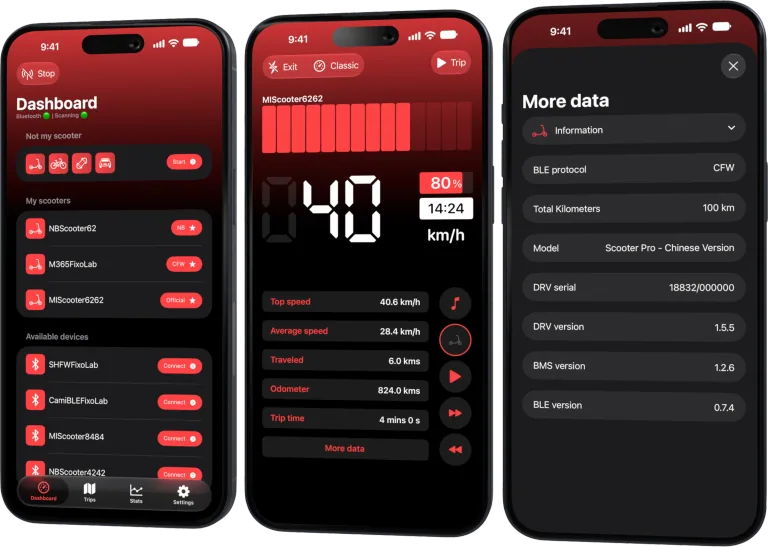
Speed, battery and trip fields appear the same as on any other verified firmware, where the combination has been tested.
What stays the same
- Live speed, battery percentage and estimated range
- Ride mode and trip history
- No cloud account required
Good to know
- SHFW verification is newer and covers fewer models than Official firmware
- Scooter Tools doesn't install, update or troubleshoot SHFW itself
Troubleshooting
My SHFW scooter isn't fully recognized
Check the compatibility table for your exact model — SHFW support is verified per model as it's tested.
Local only, by design
The connection stays a direct Bluetooth link between your phone and the scooter, regardless of firmware path.
Frequently asked questions
Is SHFW the same as CFW?
No, they're separate third-party firmware paths some owners choose. Scooter Tools reads data from supported models on either, the same way.
Can I ask Scooter Tools for SHFW installation help?
No, that's outside what Scooter Tools does — it only monitors data your scooter already reports.
See compatible Ninebot models
Check which Ninebot models and firmware paths are verified.

Your Xiaomi and Ninebot scooter dashboard
Monitor speed, battery, mileage, temperature and routes in real time, with support for official and custom firmware
Available on Android, iPhone, iPad and Mac, with iCloud sync on Apple devices
| FixoLab
What Custom Firmware (CFW) Changes for Monitoring in Scooter Tools
Understand what CFW (custom firmware) means for Scooter Tools monitoring and compatibility — it only reads data, it never installs or modifies firmware.
| FixoLab
Common Questions About Scooter Tools Compatibility With Your Scooter
Answers to the questions owners ask most about connecting Xiaomi and Ninebot scooters to Scooter Tools, from accounts to firmware to platform differences.
| FixoLab
How to choose a Xiaomi or Ninebot scooter compatible with Scooter Tools
Check exact model, region, firmware and platform support before buying a Xiaomi or Ninebot scooter for use with Scooter Tools.
| FixoLab
Choosing the Right Protocol Mode for Your Scooter
Why you don't need to choose a protocol mode yourself: Scooter Tools detects Official, CFW or NB automatically during scan and connection.