Choosing the Right Protocol Mode for Your Scooter
Protocols
Do I need to choose a protocol mode myself?
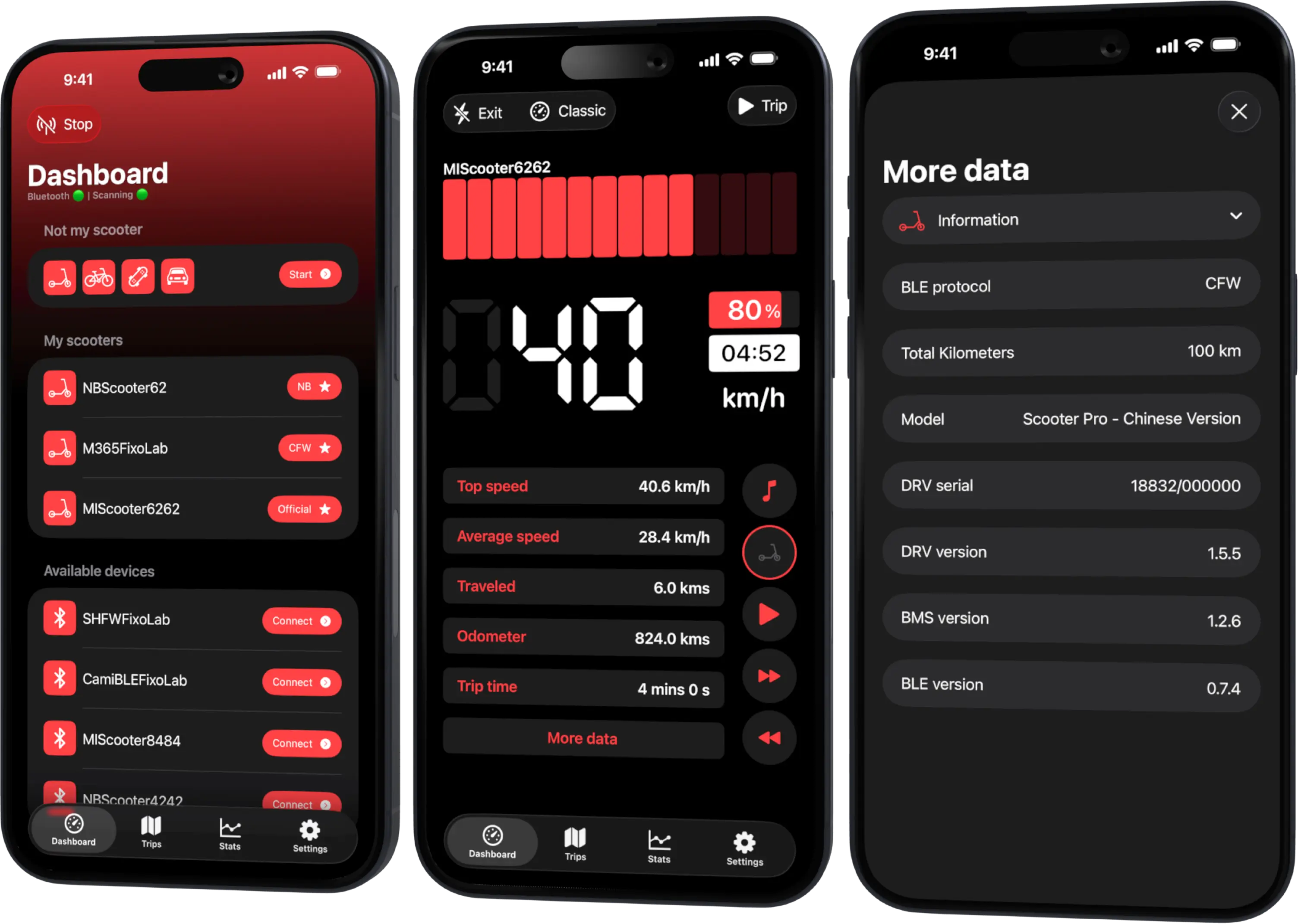
No. Scooter Tools detects whether your scooter is running Official firmware, CFW or NB automatically during the scan and connection — there's no manual mode selection.
What determines the mode
- The firmware actually installed on your scooter
- Not a setting inside Scooter Tools itself
What happens behind the scenes
- 1
Scooter Tools scans over Bluetooth
It doesn't need to know your protocol in advance.
- 2
It identifies the protocol during connection
Official, CFW or NB is detected from how the scooter responds.
- 3
It reads the fields available for that protocol
The dashboard shows whatever data is verified for your specific combination.
What this means for you
- No settings menu to configure a protocol
- The same app experience regardless of firmware
- Automatic detection on every connection
Good to know
- Available fields can still vary by protocol and firmware version
- This is about compatibility detection, not a ranking of which protocol is best
Troubleshooting
I want to know which protocol my scooter uses
Check the app's connection details after pairing, or cross-reference your model and firmware in the compatibility table.
Frequently asked questions
Can I force Scooter Tools to use a specific protocol?
No, detection is automatic based on what your scooter's firmware actually reports.
Is switching firmware something Scooter Tools helps with?
No, that happens outside the app; Scooter Tools only reads whatever protocol results from it.
Check your model and protocol
See the verified firmware combinations for your scooter.
Your Xiaomi and Ninebot scooter dashboard
Monitor speed, battery, mileage, temperature and routes in real time, with support for official and custom firmware
Available on Android, iPhone, iPad and Mac, with Wear OS support and iCloud sync on Apple devices
| FixoLab
What Official Firmware, CFW and NB Mean for Scooter Tools
Understand Official firmware, CFW and NB, the three Bluetooth modes Scooter Tools recognizes, and what each one means for monitoring your scooter.
| FixoLab
DRV, BMS and BLE Firmware Versions Explained
Learn what the DRV, BMS and BLE firmware components mean and why Scooter Tools checks all three to confirm compatibility with your scooter.
| FixoLab
What Custom Firmware (CFW) Changes for Monitoring in Scooter Tools
Understand what CFW (custom firmware) means for Scooter Tools monitoring and compatibility — it only reads data, it never installs or modifies firmware.
| FixoLab
SHFW as a Third Firmware Path for Scooter Tools Users
Understand what SHFW is, how it compares to Official firmware and CFW, and what Scooter Tools reads from scooters running it.