Recording Trips and Ride Stats Without Cloud Vehicle Control
Feature guide
How does Scooter Tools record trips and ride stats?
Scooter Tools saves trip history locally on your device as you ride, without sending your route or vehicle control commands to any cloud service.
What you need
- A connected, compatible scooter
- Location permission granted, if you want route-based stats
How it works
- 1
Connect your scooter
Trip recording starts once you're connected and riding.
- 2
Ride as usual
Speed, distance and duration are tracked for the current session.
- 3
Review trip history later
Past trips are available in the app for your own reference.
What's included
- Distance, duration and speed per trip
- Trip history you can look back on
- Data stored on your device, following the app's platform sync (iCloud on Apple devices)
Good to know
- Trip data doesn't control your scooter remotely
- Exact fields can differ slightly between iOS and Android
Troubleshooting
A trip wasn't recorded
Confirm the connection stayed active for the ride — a dropped Bluetooth connection can cut a trip short.
Your route stays yours
Trip and route data is treated as sensitive: it stays tied to your device and platform account sync, not shared to operate your scooter remotely.
Frequently asked questions
Is my route sent anywhere to control the scooter?
No, Scooter Tools never uses trip data to send remote control commands to your scooter.
Can I export my trip history?
Check the app's current export options in Settings; this can evolve between versions.
Check if your scooter is compatible
Confirm your model supports trip recording.
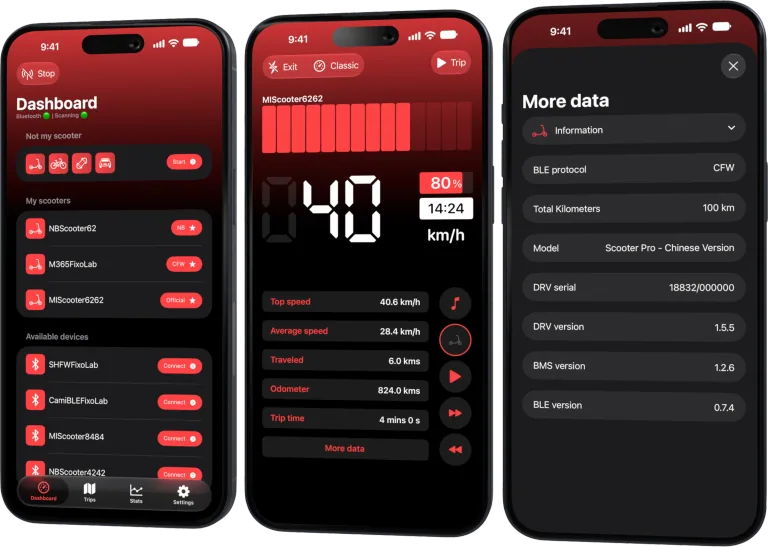
Your Xiaomi and Ninebot scooter dashboard
Monitor speed, battery, mileage, temperature and routes in real time, with support for official and custom firmware
Available on Android, iPhone, iPad and Mac, with iCloud sync on Apple devices
| FixoLab
Why scooter odometer, trip and map distance can differ
Explain differences between scooter odometer, app trip distance and mapped route using wheel data, GPS sampling, rounding and connection state.
| FixoLab
How to compare scooter rides and battery efficiency
Use repeatable routes and Scooter Tools trip data to compare battery use without confusing weather, speed, elevation or payload with battery degradation.
| FixoLab
How to manage multiple scooters and ride histories
Keep several scooters, trip records and maintenance observations separate with clear names, model context and privacy-safe exports.
| FixoLab
Using the Not My Scooter Dashboard With Your Phone's Sensors
See how Not My Scooter uses your phone's own sensors for a speedometer-style dashboard, with no Bluetooth connection to a vehicle.