How to manage multiple scooters and ride histories
A household, workshop or enthusiast can use more than one scooter, but totals become misleading when two vehicles share similar names or a trip is reviewed without its model and tire context.
Treat each scooter as its own history. Connection credentials, maintenance, battery trends and routes should not be casually copied between vehicles.

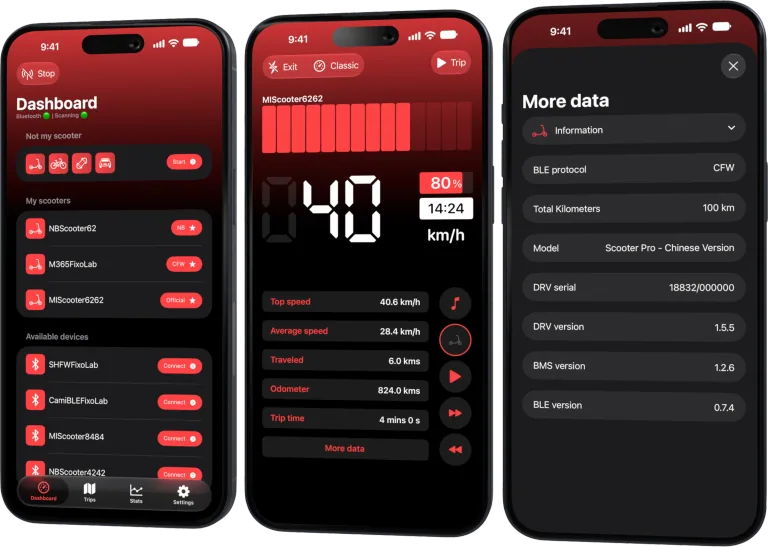
Your Xiaomi and Ninebot scooter dashboard
Monitor speed, battery, mileage, temperature and routes in real time, with support for official and custom firmware
Available on Android, iPhone, iPad and Mac, with iCloud sync on Apple devices
Give each scooter a private clear identity
Use a name you can distinguish without publishing a serial number or home address. Include the model or a neutral label such as “commute” and “spare” only if that does not expose sensitive information on widgets or screenshots.
Record the exact model, region, tire type and protocol mode in a private inventory.
Verify before every connection
When two compatible scooters are nearby:
- wake only the intended vehicle where practical;
- confirm the displayed name and model;
- select the correct protocol path;
- complete only its legitimate authentication;
- check that live speed is zero and battery matches the physical scooter;
- begin the trip after identity is clear.
Do not copy a bind key or token to another scooter entry merely because the model matches.
Keep trip context attached
Battery use cannot be compared fairly without model, battery age, tire, load and route. Label an export with a neutral scooter alias and date, then store ownership identifiers separately.
If a trip was recorded against the wrong scooter, preserve the original and correct it only using supported app behavior. Do not fabricate telemetry.
Separate maintenance records
Track tire pressure, brake service, impacts, battery symptoms and charger assignment for each vehicle. Using the wrong charger because two scooters share a shelf can be dangerous even when their connectors look similar.
Attach each charger to an unambiguous private label.
Cross-device expectations
Current behavior can differ between iOS and Android, and not every history or configuration is guaranteed to synchronize between devices. Verify before relying on a second phone as the only copy.
Export important records through supported features and protect routes and identifiers.
Selling or removing a scooter
Resolve official account transfer, remove local credentials, stop exposing it through widgets and archive only the records you legitimately need. Delete pairing material from old devices and shared notes.
Do not hand a buyer a screenshot containing another scooter’s credentials or private routes.
Compare without combining
Use separate rows for each vehicle and normalize route conditions. A portfolio total distance can be useful, but it hides which battery, tire and brake system produced the result.
Read how to compare rides and battery efficiency for a fair template.
Frequently asked questions
Can two identical models share one credential?
No assumption is safe. Credentials and account binding can be vehicle-specific.
Should I name a scooter with its serial number?
Avoid exposing full identifiers in names visible on screens and exports.
Does every history synchronize between phones?
Do not assume it. Check the current platform and feature behavior.
What should I remove before selling?
Official binding, local credentials, widgets and unnecessary private records, following the manufacturer transfer process.
Your Xiaomi and Ninebot scooter dashboard
Monitor speed, battery, mileage, temperature and routes in real time, with support for official and custom firmware
Available on Android, iPhone, iPad and Mac, with iCloud sync on Apple devices
| FixoLab
How to compare scooter rides and battery efficiency
Use repeatable routes and Scooter Tools trip data to compare battery use without confusing weather, speed, elevation or payload with battery degradation.
| FixoLab
Why scooter odometer, trip and map distance can differ
Explain differences between scooter odometer, app trip distance and mapped route using wheel data, GPS sampling, rounding and connection state.
| FixoLab
Using the Not My Scooter Dashboard With Your Phone's Sensors
See how Not My Scooter uses your phone's own sensors for a speedometer-style dashboard, with no Bluetooth connection to a vehicle.
| FixoLab
Recording Trips and Ride Stats Without Cloud Vehicle Control
How Scooter Tools saves trip history and ride stats locally on your device as you ride, without sending your route or vehicle control commands to any cloud service.