How Xiaomi Home and Scooter Tools can work together
Xiaomi Home and Scooter Tools serve different roles. Keeping both available lets the official app manage provider responsibilities while Scooter Tools handles supported local telemetry and trips.
Scooter Tools can show supported local Bluetooth telemetry and trip context. It does not flash firmware, bypass ownership, certify a repair or replace the scooter manufacturer’s safety instructions.

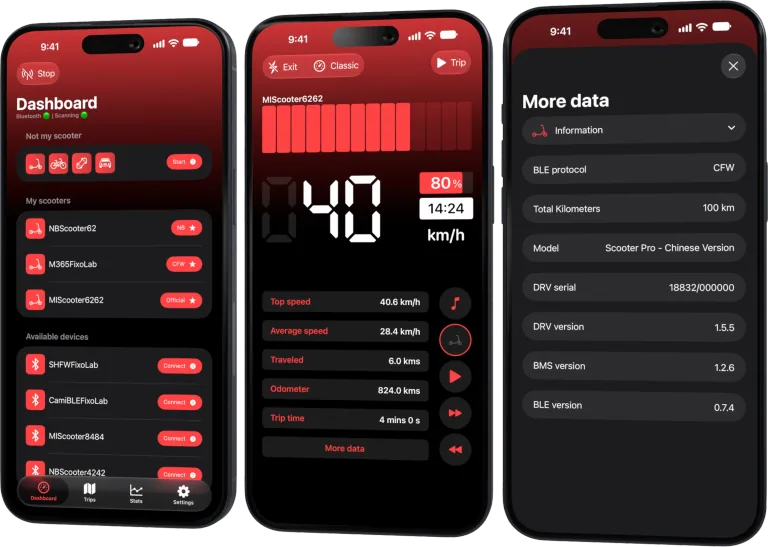
Your Xiaomi and Ninebot scooter dashboard
Monitor speed, battery, mileage, temperature and routes in real time, with support for official and custom firmware
Available on Android, iPhone, iPad and Mac, with iCloud sync on Apple devices
Reserve official tasks for Xiaomi Home
Use the official app for activation, account binding, approved firmware and settings that Xiaomi owns. Preserve access for warranty and support.
Use Scooter Tools for its supported scope
Connect locally over Bluetooth for compatible dashboards and trip recording. The connection does not route through a Scooter Tools cloud control service.
Avoid simultaneous Bluetooth ownership
A scooter may accept only one active app session. Fully close or disconnect one app before opening the other, then let the scooter settle before retrying.
Keep configuration evidence
Record the exact model, region and firmware before an official update. If compatibility changes, that context helps distinguish an app issue from a protocol change.
Safe review checklist
- Complete official setup first.
- Close Xiaomi Home before local monitoring.
- Use the compatible Scooter Tools mode.
- Return to Xiaomi Home for official updates.
Frequently asked questions
Does Scooter Tools replace Xiaomi Home?
No. It complements official ownership functions on supported models.
Can both apps connect at the same moment?
Often not reliably; use one active Bluetooth session at a time.
Does Scooter Tools modify Xiaomi firmware?
No. It is not a firmware installer or flasher.
Your Xiaomi and Ninebot scooter dashboard
Monitor speed, battery, mileage, temperature and routes in real time, with support for official and custom firmware
Available on Android, iPhone, iPad and Mac, with iCloud sync on Apple devices
| FixoLab
Battery percentage and voltage on an electric scooter
Understand why scooter battery percentage is an estimate and how voltage adds context without becoming a direct health score.
| FixoLab
Why scooter odometer, trip and map distance can differ
Explain differences between scooter odometer, app trip distance and mapped route using wheel data, GPS sampling, rounding and connection state.
| FixoLab
How to estimate real electric scooter charging time
Estimate charge duration from usable battery energy, charger output and the slower final phase without promising an exact result.
| FixoLab
How to interpret electric scooter charger LEDs safely
Read charger light states as clues while treating the exact scooter and charger manual as the authority.