How to verify compatibility for a new scooter model
A new model can share a brand and appearance with an older scooter while using a different controller, authentication flow or Bluetooth protocol. Compatibility must be verified model by model.
Scooter Tools can show supported local Bluetooth telemetry and trip context. It does not flash firmware, bypass ownership, certify a repair or replace the scooter manufacturer’s safety instructions.
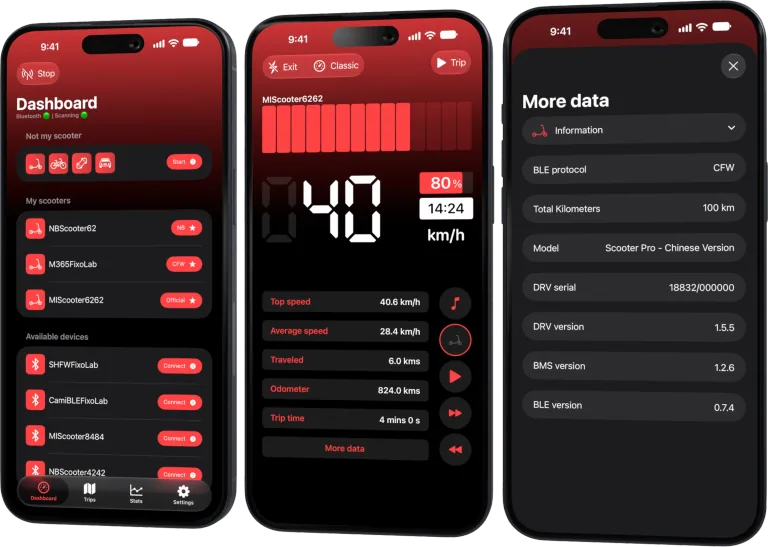
Your Xiaomi and Ninebot scooter dashboard
Monitor speed, battery, mileage, temperature and routes in real time, with support for official and custom firmware
Available on Android, iPhone, iPad and Mac, with iCloud sync on Apple devices
Capture exact identity
Use the official model name, regional suffix, product code and hardware revision. Avoid posting a full serial number or ownership token.
Check the live compatibility page
Treat the current Scooter Tools compatibility list as the authority. A search result or old blog article may predate a firmware or app change.
Verify the phone platform
iOS and Android can differ in permission behavior and release timing. Confirm support for the platform and app version you will actually use.
Test safely before relying on it
With a stationary scooter, try discovery and basic telemetry using the documented mode. Do not purchase or alter firmware based only on a visual similarity.
Safe review checklist
- Record exact regional model.
- Check the current compatibility entry.
- Confirm iOS or Android support.
- Test stationary read-only telemetry.
Frequently asked questions
Does brand support mean every new model works?
No.
Can a reviewer confirm compatibility from screenshots?
Screenshots help identify a model but do not prove protocol support.
What should a useful compatibility report include?
Redacted model identity, region, firmware, app platform and the exact connection result.
Your Xiaomi and Ninebot scooter dashboard
Monitor speed, battery, mileage, temperature and routes in real time, with support for official and custom firmware
Available on Android, iPhone, iPad and Mac, with iCloud sync on Apple devices
| FixoLab
An exact model checklist before buying a scooter on Black Friday
Verify identity, support, charger, warranty and real use needs before choosing a discounted electric scooter.
| FixoLab
Why region and controller revision affect scooter compatibility
Understand how regional models and hardware revisions can change Bluetooth protocol and app support.
| FixoLab
Does Scooter Tools install or modify scooter firmware
Learn the boundary between Scooter Tools monitoring and firmware installation, tuning or unlocking.
| FixoLab
How Scooter Tools monitors a scooter running SHFW
Understand the read-only monitoring relationship between compatible SHFW configurations and Scooter Tools.