How Scooter Tools monitors a scooter running SHFW
Some compatible scooters may expose telemetry while running SHFW. Scooter Tools can monitor supported data, but it does not install, configure or tune that firmware.
Scooter Tools can show supported local Bluetooth telemetry and trip context. It does not flash firmware, bypass ownership, certify a repair or replace the scooter manufacturer’s safety instructions.
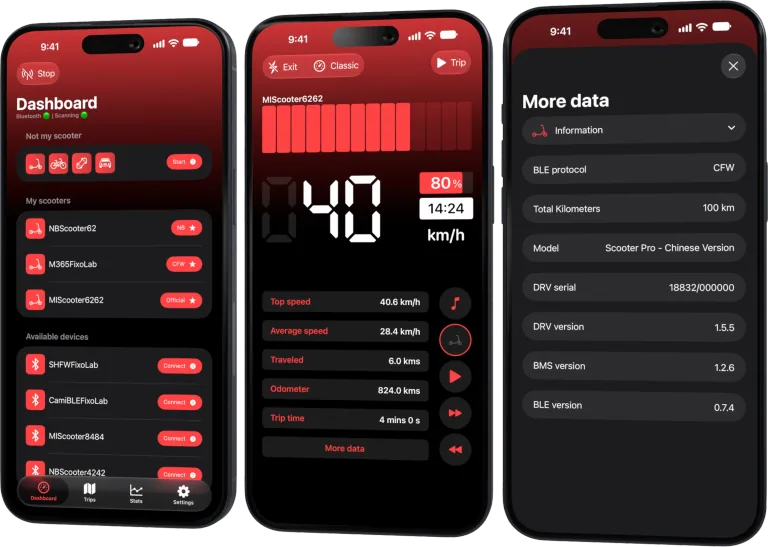
Your Xiaomi and Ninebot scooter dashboard
Monitor speed, battery, mileage, temperature and routes in real time, with support for official and custom firmware
Available on Android, iPhone, iPad and Mac, with iCloud sync on Apple devices
Confirm the complete configuration
Record scooter model, controller and firmware path. SHFW compatibility depends on the hardware and protocol, not the name alone.
Connect for monitoring
Use the supported Bluetooth mode and legitimate authentication material. Start with the scooter stationary and verify basic telemetry before recording a route.
Keep tuning outside Scooter Tools
Power, speed, current and braking parameters can affect safety, legality and hardware life. Scooter Tools does not change those values and this guide does not provide tuning instructions.
Diagnose changes by version
If monitoring stops after a firmware change, note the previous and current versions and the visible error. Return to the firmware’s own documentation for configuration questions.
Safe review checklist
- Identify model and firmware version.
- Verify lawful safe configuration.
- Test stationary telemetry.
- Record changes before troubleshooting.
Frequently asked questions
Can Scooter Tools install SHFW?
No.
Can it change speed or power settings?
No. It monitors supported telemetry and trips.
Does SHFW guarantee compatibility?
No. Hardware, protocol and authentication still matter.
Your Xiaomi and Ninebot scooter dashboard
Monitor speed, battery, mileage, temperature and routes in real time, with support for official and custom firmware
Available on Android, iPhone, iPad and Mac, with iCloud sync on Apple devices
| FixoLab
An exact model checklist before buying a scooter on Black Friday
Verify identity, support, charger, warranty and real use needs before choosing a discounted electric scooter.
| FixoLab
How to choose a compatible replacement scooter charger
Verify voltage, connector, polarity, current and manufacturer approval before replacing an electric scooter charger.
| FixoLab
How to choose an app for your electric scooter
Compare the manufacturer app with local Bluetooth monitoring, trip records and support for your exact model.
| FixoLab
Choosing the Right Protocol Mode for Your Scooter
Why you don't need to choose a protocol mode yourself: Scooter Tools detects Official, CFW or NB automatically during scan and connection.